TechBlo.com - Technology Views, Reviews, and News
Read This Article In Your Language!
Showing posts with label gadgets. Show all posts

Wednesday, August 29

Hotz is Hot with a Deal!

Wikipedia has an article on him already, He has blood pumping in the Apple camp, there are news results in "Google News", CNN, BBC and Times. Who is this 17 year old New Jersey teen? What does he do? Why is he famous? - He Hacked the iPhone!

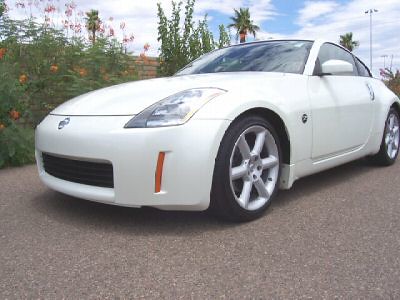
Hotz has traded his iPhone hack with CertiCell a Kentucy based Cell Phone repair company for a Nissan 350Z Speed Car and 3 80GB iPhones to be given away to his 3 online collaborators[ jpetrie, gray, and iProof] who worked with him for about 500 hours(8 hours a day) during the holidays.

George Francis Hotz (born October 2, 1989), alias geohot, is an American student best known for producing the world's first full hardware unlock of the Apple iPhone, allowing the phone to be used with other wireless carriers, not just AT&T as Apple intended.
Hotz dismissed his friends when they called him wasting his holidays, guess this is the reward he gets for toiling with Online collaborators to hack the iPhone - AT&T monopoly!

Hotz has been asked to do consulting work for Certicell and Puremobile, Hotz uses blogger.com for blogging. His next project will be to make a GPS for the iPhone that uses Triangluation from the cell phone towers.

Thursday, August 9

How To Clean Your Camera's Memory Card? - Simple Easy Home Made Methods.

I have been using electronic equipments with various memory chips for many years, and have understood that cleaning them regularly will help in the longer run. Here are some easy simple affordable tips and tricks to clean your Data Storage Devices such as Memory Cards, CD Disks, and DVD Diskettes.

Memory cards have a tiny metal strip on the top end, you have to keep these dust free and sediment free. To clean these you can do the following:

  1. Spit on them and wipe with a dust free cloth. (Use your Saliva would be a decent way to say). Spitting on these surfaces are perfectly safe, as long as you clean them spec free.
  2. You can alternatively use a "Goggle Cleaning Cloth" that is less abrasive.
  3. You can buy a less than $1 Scotch-Brite® Scratch Proof - Wipes from 3M, a popular Media Manufacturing company.
  4. Use Banana to wipe the shining surface of your DVD/CD and wipe it with a clean Cloth. This enables you to restore your backup, that you thought you lost.
  5. Cleaning CD/DVD with liquid soap, and then wiping it with a clean dust free cloth would do wonders. You can try it on your old VCD and test if it works.
These tips hold good for the following types of Memory Cards:
Smart Disk, SD Cards, CF Cards(Compact Flash), Memory Stick Pro, Duo, Micro SD Cards, Mini SD Cards, MMC(Multimedia Memory Cards) and xD Cards.

Note: If you like to know how the Scotch-Brite® Scratch Proof - Wipes look like, leave a comment, I shall send you the Image.

Wednesday, August 8

Make Your GorillaPod - Cheap, Easy and Fun!

Buying a GorillaPod is easy too, but making one is just fun, and it works out cheaper than you can imagine. Here is an inspired version of the GorillaPod from Instructables. But this one is much cheaper, and less sticky. The method used by "theRiaa" was my base idea, I have just replaced the insulation tape with a "PVC Plastic Non Stick Tape" and a Duck Tape.

You Need:

  1. Duck Tape
  2. A PVC Non Stick Tape (find in your plumbing store)
  3. Copper Wires (as thick as you like, it should bend), you can use Aluminium Wires as well.
  4. A 1/4" [get the mm definition] bolt, from your local hardware store.
  5. Nuts to match the Bolts.


Making a Gorillapod


Making a Gorillapod

Virtually these are not rocket science ingredients, so it is just a walk to your hardware stores away, and costs less than $1. You might have the Duck Tape in your home already (I did).

Making a Gorillapod


Now the first job is to cut the Copper Wire into 3 pieces of same length. I suggest cutting it to 15 cms long, use your pliers to cut them. Once you have the 3 pieces cut, you have to make a loop at one end of them [refer image below].


Making a Gorillapod

Insulate the 3 Legs with the PVC Tape, so that they look "Cool" -:)

Making a Gorillapod


Once you have the loops done, place it near the Bolt Head and start insulating it with the Duck Tape, and when you have insulated with 5 to 7 layers, place the next "leg" and start to do the same, then add the 3d LEG and do it till you are satisfied with the thickness. It should be a sturdy insulation now.
You can now use the PVC Tape to insulate a few rounds over the Duck Tape, so that it does not stick to your hand on every usage. This is very simple to do.

Making a Gorillapod


Make sure you do not "Over Twist" your camera on to this Flexible Table Top Tripod. If you have a plastic thread on your camera, you need to be double careful not to over thread the Bolt to your camera.
This idea holds good for a Compact Digital to a Point-And-Shoot Digital camera that weighs about 600 Grams. I tried mounting a 200 Grams camera (Kodak C653) and a 600 Grams Camera (Canon Powershot S3 IS) and it was stable.

Making a Gorillapod


Make sure you check the copper wire before you buy it, it should be a good thick wire that can bend as necessary but tuff. This is the one major thing you need to see before you buy, else you shall topple your camera while on mount. Better carry your camera while you buy your "bolt". Good Luck in creating your Flexible Gorillapod.
I would like to call this with many names, you can suggest some if you like:

  1. FlexiPod
  2. Tabletop Tripod
  3. TreePod
  4. GorillaPod
  5. MiniPod
  6. TentaclePod
  7. "you suggest, I will add it here..."

Tuesday, August 7

iPhone Style iTheme for Symbian S60 Mobiles

iPhone Style iTheme for the Series 60 Mobile Phones released. S60 3d Edition Phones can now look like iPhones, but this will no way make u an iPhone user nor give you the feel. But this is just a cheap imitation. If you love to use it, you are welcome..[huh]


[Via Darla Mack]

Wednesday, August 1

Nokia Symbian Wireless Security Camera

You would be aware of how to use your Symbian Phone as a Webcam if you have read my previous post"How To Use your N70 as a wireless webcam", here I will introduce you to a relatively old Nokia Gadget called "Nokia Remote Camera pt-6". This is a dedicated "Security Camera" for your Home, Shop, Gym, Pool or even as a Baby Monitor [ Check how you can use your Nokia N70 and other Symbian Phones as a Baby Monitor]

Nokia devices are easy to use and relatively cheap compared to other "Branded Gadgets", and so is the PT6. PT6 can be installed by the very average user, in his premises without any technical help. Just follow my guide here to setup a security monitor for your privacy.

Nokia PT6 is a smart piece of gadget, just smaller than an average mobile phone, and it "perches" to a small nifty stand for better mount and rotation. Once you put it on the stand in a desirable spot [best to mount it on the wall where the full room is covered under the lens] it is all set. You have to make sure it has enough power to run, and switch it on and set a "SIM Card" with MMS capabilities inside it. You can assign a certain number or a "bunch of numbers" to the Nokia PT6.

The Nokia PT6 can monitor the room from then on, and detect any motion under it's sensitive lens. Once it picks up some motion, it can send you the "Screen Capture" with the MMS capabilities of the inserted SIM card. Where ever you are, you will be able to have an eye on your room with this neat utility.

The Nokia PT6 can capture on certain "KEY Commands", you have to send a certain SMS to your Nokia PT6 and it will reply with an MMS of the current screen shot. Or you can set an interval for your "captures" and the PT6 will keep sending you images to your desired number in this interval.

Sounds good? go ahead and get one gadget for yourself, and start to Monitor your Office, Home, Pool, Classroom or just have fun with it! It is how science and technology has brought the best of things to your home!!

Thursday, July 19

N95 - Nokia Announces the release of A-GPS

Nokia users who use certain GPS enabled handsets will no longer be lost in this vast wide world. They have a very fast service that can tell where they are and show route to where they need to go.

Assisted GPS(A-GPS) service is the feature that helps Nokia Maps user find his current position, Nokia intends to equip all of the future devices with this service. Nokia 6110 navigator has begun shipping in select regions and N95 users can cheer too. With the most recent release of the upgrading software for the N95 multimedia computer, one can reap the benefits of A-GPS.

Owners of the Nokia N95 can now get this free service by downloading the Nokia Software Updater from - http://www.nokia.com/softwareupdate This will update the firmware on the device to the latest version - claims Nokia.

TTFF (time ti first fix) has been dramatically reduced, and so the time taken to know a certain position of the Mobile is faster.

For more info on Nokia Maps - check their site.

Zoom Tele Lens for Nokia N95

Now you can shed the complex that you have developed over not having an impressive Zoom Function in your Nokia N95 5Mp Camera Phone. This N95 camera case can give you an awesome 6x Optical Zoom like feel, and is easy to use, cheap to buy. It is a wonderful idea, it will not hurt your mobile phone, and you can remove and attach it in a jiff.

Now zoom closer at those objects of desire and shoot them with a good 5Mp effective pixel rate. You should enjoy doing so, and the results are enjoyable too. Here is the link for the ebay seller who sells this piece of magic - ebay seller!

Monday, July 16

Techblo's Top 5 Under $200 Digital Cameras

This is Our Special Edition for this Holiday Season: Top 5 Under $200 Digital Cameras
[Only Compact and Ultra-Compact Form Factors are suggested here under]

tips for buying a digital cameraCanon PowerShot A630: Canon leads the Digital Camera arena and this is a steal for under $200 coupled with a underwater waterproof casing this is you perfect Snorkeling Vacation Camera! Canon A630 is the best in category with a 8Mega Pixel resolution complemented by a 4X optical zoom. 80 to 800 ISO range allows you to shoot in bright beach light and in very low light conditions, wonderful 9-point Auto focus allows you to capture a large group of friends in your small camera - with great face clarity! That is enough of cream for a under $200 camera, and this monster give you more, like a Tilt and Twist LCD, Manual and Preset White balance, Lens thread with adapter facility (so you can add a tele zoom lens), stores in the most common SD Memory card and supports MMC as well, runs on typical AA cells(so you never short of them), video out to view your pictures directly on a TV Screen, and hey it is quite heavy enough for a steady shot(315grams) !

Casio Exilim EX-Z70: Under $200 this is a very cute little camera that sits in your pocket without bothering you, providing 7.0MP, 3X zoom, Video Clip capability, and very easy to use menus. This ultra compact digital camera has to be driven by a Lithium Ion rechargeable battery and that sets you back by the limitation of it's charge. Otherwise this is just a wonder and we recommend this for the traveler who likes a light weight camera. [I suggest this for Traveling Elders, Parents, and Grand Pa's - Ideal Çoz it is light and easy to use]

Nikon Coolpix L12: This popular Nikon Coolpix model gives you a 3X Zoom on a 7.1Mega Pixel camera. This camera comes with a great feature called IS (Image Stabilization) which is good for minimizing camera shake. Perfect for a vacation, where you are not a focusing on a perfect shot, but a shot to register the moment! So go ahead enjoy the moment and point-and-shoot leaving the rest to the IS of this camera. Manual white balance, Continuous drive, and a large 2.5" LCD screen makes this edge out in the under $200 category. [A bit advanced model, for the enthusiastic traveler]

Fujifilm FinePix A610: Just announced Jan'07 this is a wonderful compact digital camera, with great user reviews all over the world, very popular and less expensive (under $150) delivering crisp pictures and great prints. The 2.5" large LCD display and the 3X Zoom makes it a great camera with power to shoot video, and the best part is it runs on 2 AA batteries and you are safe on your trip, with AA batteries all around the world.

Panasonic Lumix DMC-LZ7[party-goers camera]: Lumix LZ7's got a good grip, and it fits well in your bag/pouch, small enough to fit your pocket too. Loaded with a mega 7X Zoom and 7.1MP effective pixel rate, this camera comes with ISO settings from 80 to a Mega 3200(HI ISO) to shoot best at low light conditions. If you are the type that parties a lot during holidays, or everyday - this is the best bet under $200 to shoot low light pictures. The 60 sec Min shutter means this is made for low light conditions in mind, and it serves the purpose very well, beating the other competitors for this specific feature. Runs on AA(2) batteries sporting a large 2.5"LCD and an added advantage of Image Stabilization. [I would call this the party-goers digital camera]

Note: I would never suggest a Sony Product for the fact that it makes use of a proprietary "Memory Stick" for storing data. This sets you back tying you to this Memory Stick in all your digital equipments, meaning you have to use Sony Products only or use different memory cards for each of your equipment. I would not suggest this, you better look for the Equipment that sports a common memory card like the "SD Memory" or the "Compact Flash". This saves you hundreds of dollars and saves you in certain situations - you can swap memory cards from your mobile to your camera, or MP3 player or PDA.

Sunday, July 15

How To Choose Your Digital Camera? - Tips and Tricks Using Flickr

Don't have the time to research for a new camera? If you are in a hurry here is some cool suggestions for picking a Digital Camera for your vacation - fast! Read the Author's choice of Top 5 Digitals

Choosing a product for the home or a personal equipment used to be a "Showroom Specific" process a few years back. But these days, with the invent of Internet Shopping and Research the flexibility available of the consumer has grown exponentially. Research - true; you have to research well before you select a product, if you are concerned about the value for money you shell out. Coughing out a few dollars on a gadget should do justice to the money spent, else the whole process of buying and enjoyment there after will be in a jeopardy.

Well, now choosing a Digital Camera is quite an important agenda in one's life. Why? - çoz the camera will be your only source of capturing happy moments while you are on a vacation or for an important party/marriage. So choosing a sloppy camera with blotting photo results will not be what you desire. Here are some detailed methods to choose the right camera with the power of Internet, which cannot be compared with a Showroom Shopping. Showroom shopping cannot give you this much power to choose and flexibility.

dpreview.comDigital Cameras are of various types, sizes and features; choosing the one you want is in your hands. You have to decide what you are looking for - Size or Features or Style or Budget or Type or Quality. There are thousands of digital cameras in the market now, with hundreds being introduced in the market every month - thanks to the stiff competition between manufacturers.

Decide what Size factor suits your need first. Some people want a camera to capture precious moments in their life, with a good quality but need something that fits in their pocket. Some like the camera to be a bit bulky so they get a good grip and stability while holding it. Some are hard core professionals that look for the best in the market, and know what they want exactly.

Once you make you mind with the size, you have filtered out some other options, and get to the next important factor - budget. To make life easier, most online shopping carts have a wizard like feature to filter out the unwanted factors, so that you are left with the remaining lot to choose from. Exploit these websites, you do not have to buy online in essence, just use the wizard to make your choice, later compare with your local dealer and decide if to get from the website or not. [I often use this tool from the Popular dpreview.com website]

Now you know how to use an online shopping site to choose your camera, but you need to know the quality of the camera - this cannot be made available in any Showroom as far I know. Only with the realm of the Internet checking the output of a camera in an instant is possible.

Flickr is a photo sharing Web2.0 site, where thousands of digital photographs are uploaded by users to share them with friends, relatives and the world. You can exploit some nifty features of this website to see the quality and output of a certain digital camera that you have filtered on. I will explain how to use them in the following section, read on..

I prefer to use Flickr, for it's nifty applications. After choosing models with the help of the above filtering technique, you should have a few models to choose from. The only decision you have to make now is that of the quality of the pictures that these models can produce. To check the quality, you have to make use of "Camera Finder" feature of Flickr. With the help of this tool one can choose a camera, and see photographs taken with that particular model [thanks to the advent of EXIF data]. This is a wonderful application for choosing the right camera model for your vacation!

Patiently spend a few minutes with this application to see the results from various users of Flickr community for Quality of the photographs, colors, and clarity. Use the process to find pictures for each camera model you have chosen and compare them manually with a vigil eye. You should be conveniently satisfied with a 1 or 2 of camera models now, and it is you who have to make the decision now. Use your common sense and your budget to choose the final model camera. Run the Flickr application once again and see if you like the photographs taken with them, and you like the quality.

Some tips:
  1. See the largest possible size to check for Quality.
  2. Pictures must be less Grainy.
  3. Lesser the Noise level the better for print.
  4. See for colors, and check how natural they are.
  5. Check all the "Now Showing" options of Flickr, like Portrait Photos, Landscape Photos, Night Photos, Macro Photos - this helps you decide on what level of photos you will shoot often.
There are quite a lot of Form Factors in Digital cameras, here are a few listed for your convenience: Compact, Ultra-Compact, SLR-Like, SLR(professional), Point-and-Shoot and so on. Some popular brands of Camera's available are Nikon, Canon, Kodak, Minolta(Konika), Fuji, Casio, Nokia, Motorola, Sanyo, Sony, agfa, contax, epson, HP, JVC, Kyocera, Leica, Olympus, Panasonic, Pentax, Ricoh, Samsung, Sigma and Toshiba.

Go on pick the right one that suits your style and trend., Happy Hunting.

[You might like to read more about Photography, Storage and perfect combo of devices for the On Road Warrior!]
  1. GeoTag Your Photos While You Shoot
  2. Archos - Arachnoid of the PMP Arena - "Ditch Your iPhone Dreams"
  3. Best Photography Storage Devices For the On Road Warrior!
  4. Canon Shelphy CP740 - Canon Hand held

Saturday, July 14

Never Loose Memory of your Photos - Geo Tag Web2.0

Following our Sony GPS post, we have an interesting Web2.0 Site - Locr that allows you to geotag your photos with or without a gadget. More over, you can share your photographs with friends and fmily and stranges as well with the site's capacity to collaborate.

Any photo can be geotagged using two methods (manual or automatic). The geotagging is done on the locr web site or by using free locr PC software, which you can download here: Downloads

Once you tag them, you can see your pictures on their site on a sat map, or a hybrid map (Like Google map or Flickr Location).

Have fun, and you may never loose note of your photographs again. You will never be asked where was this taken?!

You might like to read these related articles:

  1. GeoTag Your Photos While You Shoot
  2. Archos - Arachnoid of the PMP Arena - "Ditch Your iPhone Dreams"
  3. Best Photography Storage Devices For the On Road Warrior!
  4. Canon Shelphy CP740 - Canon Hand held
GeoTag Your Photos While You Shoot - With This Cool Gadget

Taking pictures can be fun, but tagging them with the limited memory you have is a pain. How about tagging them with precision?, with which latitude and Longitude the picture was taken? - this is made easy with the GPS Tracker equipment for your camera[like the Place This Photo On A Map of Flickr]. Any model with a Date/Time facility would be ready for use with this wonderful little gadget.

It looks cool, much like your "Thumb Drive" it humbly hangs on your bag or trouser loop, and keep track of where ever you go on this earth! I like the design of this device, it is much simple and trendy with no complications at all. I mean it, no complications, just one button and that is it! Hard to believe, here is how it works:

1. Switch it on, wait to receive (GPS) signals. A green LED light flashes once, slowly.
2. No cables, no hassles, dig out your digital camera, and start shooting.
3. It actually works without any connection, so you have to Sync your photos on a daily basis or in short intervals. (I think this is a little mad idea, but for the cheap cost of the GPS unit, I'm OK with it)
4. Once you finish the day's shoot, you can import the pictures to your PC with your favorite software(Google Picasa or Adobe Photoshop or Just Windows XP/Vista).
5. Connect the GPS Device with given USB cable, download the LOG files with the GPS software.
6. An Image Tracker software supplied with the unit makes it easier for you to match your pictures with the recorded data. The verified positioning information is written to the Imagesony GPS Headers.

The Gadget: Sony Style - GPS-CS1 - Digital Camera Digital Photo Mapping Tool (Geo Tag)

Pros: It is cheap, it works without wires.

Cons: It is frustrating that you have to get to work at the end of every photo shoot or the day to sync your pictures and Geotag them!

Runs on batteries that can last for just 10-14 hours(NiMH)

Note: This is no replacement for the Red hen systems, and so do not compare it with the Red Hens. Red hen systems are for the professional and research photographers, and no one would like to through so much dough on them for fun.

Thursday, July 12

Archos - Arachnoid of the PMP Arena - "Ditch Your iPhone Dreams"

Archos - Arachnoid of the PMP Arena?

I bet you will ditch your iPhone Dreams after you read this article!

Archos must be one of the best PMP's in the Arena, that could have come out from a frustrated iPod user? This packs almost all that one can imagine and more than that!

Let's get to the features of Archos wasting no more time. The looks are simple, and yet elegant, well thought of design, neat colors, and thoughtful button positioning. Ergonomically the Archos beats the " Thumb Driven Zen and iPod" - is that only it? Read on..

Built-In Camcorder - Imagine not a Still Camera, but a full fledged Camcorder on your PMP! Yes that is true, you have a high resolution camcorder that can shoot till you burn all the left out memory! Indeed! 30 to 160 Gigs of memory to shoot for a life time!

Plays Videos - Archos can play every known type of Popular Video Files such as WMV, MPEG-4, AAC, Quicktime and JPEG Photos as well. The all new high resolution screen with a 800x480 pixel resolution makes it much of a delight to watch.

archos multimedia player
Record TV - Hey this is cool, With the optional DVR Station, you can record your Fav TV Show and watch it later while on your car or Bus to work! You can record from a TV, DVD Player, STBox/Cable Box or even a VCR! [yuk, why did they forget a FM Tuner?]

Photo Viewer - Photos look so good on the Archos, more with Music and Transition effects. Yes you can build a Slide Show in a jiff, add music to it, run it straight on the TV using the Optional DVR Station. [Microsoft Photostory will weep blood now?]

Photo Transfer - One can connect a digital camera and transfer photos directly to the Archos. Transfer it, make a slide show, add background music [throw that bulky laptop dude] from your music collection - See it on any TV where ever you are! - [insane right? - but it is true.! Just the kind of gadget I would Love!]

And yeah it plays Music too, did i forget? - Nah. Archos can play your Music from MP3 to WMV - this will be the least feature I would want to mention! [C'mon man, Archos has got so much why would I talk about Just playing Music?]

Sync with Windows Media Player every time you connect to the system and charge the batteries same time. This is hassle free!

Storage - 30GB can store upto 40 movies[QVGA resolution MPEG-4 at 1000 KBPS] or 3,00,000 photographs or 15,000 songs[128 Kbits/s]
Archos comes in 30, 80 and a 160 GB flavor - which is your choice?

Connectivity - WiFi inside Archos can stream Video/Audio/Jpeg content to your WiFi enabled Set Top Box! - Wires - for the lame! Go WiFi and get tangle free! Use [read Exploit] the best technology can offer!

Display - Sports a high resolution 4.3'' touch screen (800x480 pixels)

Internet enabled to surf the Web, share content, and access Web video sites (eg DailyMotion)

Note: Ok - this is supposed to be the best bet for our Digital Photography On The Go Storage/Viewer Combo. But I thought this was too advanced, and would distract the Photographer from Shooting! So I thought to review this in a seperate post.

Wednesday, July 11

Best Photography Storage Devices For the On Road Warrior - Part II

Best Photography Storage Devices For the On Road Warrior - Part II

Creative Zen Vision -
A Definite Winner to look up!


I have been using a Creative Nomad for very long, and I know how "Creative's Gadgets" are sturdy and trust worthy. "Firmware updates" to "Ease Of Use", Creative just surpasses the consumer's desire[Yeah Desire]. Well this neat large screen device scores the best accolades from users all over the world, and from critics as well. Creative has grown from a humble Nomad MP3 player to the Monstrous ZEN Vision (30Giga Black) all through the years just getting better and better. From the days of Diamond Rio(must be the first MP3 player in the world, along with MP-Man) till date Creative has been competitive in bringing out various flavors of PMP's [personal multimedia players] to enthrall the consumer.

This Monster ZEN Vision, is the Crown in Creative's gadgets so far, it is also a best bet for the Road Warrior who likes to photograph like mad, and store it and view it in a great device. This is not a tiny gadget, but a decent Big Screen gadget that allows you to store and view from your camera through various input methods including the much wanted Compact Flash Slot. The DSLR buff can be happy that he has a viewer and storage unit that can read on the fly from his Compact Flash Card. No need for any external OS Driven devices, to read from the Card. Just insert and the Zen starts to display what is inside the CF Card. The Zen comes in a variety of flavors(storage) and hence the 30GB would suit your need, store 3-5Gb of music and video and keep the rest 25GB for the Photography Enthusiast in you. [You shall decide the best ratio, this is just an idea I would go about! :p ]

There is nothing bad about the Zen to talk about, so I stay away from the CONs of this device, it is a wonderful thing, and will make you feel great. It comes with a variety of extra features like the Outlook Sync to your PC, Ultra High Resolution Screen[really good], Records from FM[plays Fm indeed], Supports recording video from TV - and above all it is priced very reasonably priced[under $400] for a 30GB Hard Disk!! Battery life is amazing with the Audio Player, and the battery is removable - means you can carry a backup cell.

[will continue in the part III of Best Photography Storage Devices For the On Road Warrior!, I would tell the Best Device Combo for the Voracious Travel Buff!]

Nokia N800 Now Skype Enabled

Espoo, Finland and Luxembourg - Skype(TM), now on N800 Internet Tablet. You will be talking on Skype from anywhere in the world with the convenience of your handset, provided you are on WiFi or an alternative Internet connection.

Skype for the Nokia N800 will be available for existing users. Skype download links will be made available in the coming N800 handsets. Skype online stores will make this update available on their retail website either.

Imagine making "Internet Calls" through Skype from virtually anywhere like a Pub, Coffee Pub, Parks, Offices, Hotels, or a cinema hall too! [provided you find a hot Spot!]


Tuesday, July 10

Best Photography Storage Devices For the On Road Warrior!

Off late I have been searching for a device for assisting me storing my snaps on the go. I used to carry my laptop for this before, but that has become a extra baggage. I wanted the same convenience of a Laptop but a less bulkier device, something like a portable hand held computer(PDA?) or an alternative. Some of these were my choices:

  1. Portable DVD Player - That which can read from SD/xD Cards.
  2. A Pocket Storage device that stores in Giga Bytes.
  3. A PDA hand held Computer
Cost is a big factor, and so is the feature set, always we expect a better bet right? I look for a good storage device that can store all my snaps during a long trip. Say anything from a 6GB to 150GB monster would do the trick. I have searched for some time now, and have seen many gadgets that serve this purpose, but would it be nicer if we have a storage device coupled with a JPEG viewer?

Yeah that is why i have filtered on few devices with a large to medium LCD Scree, but the Pocket Device(a Digital Wallet) is only a storage device with no display feature.

A) One Portable DVD player that supports SD Memory is the Toshiba SD-P2600. This is a large screen portable DVD Player that can address your on the go Picture Viewing issues. It can read from a SD(Smart Disk Memory) or a CF(Compact Flash memory) which is why this fancies moi. One big blow is, it does not have a storage unit. Would be nicer if Toshiba's Compact Storage Wing gets an eye on this article, and thinks to add a storage unit to this DVD Player.

The crystal clear LCD display makes it a wonderful choice, it couples as a entertainment gadget and a picture viewer. You can watch DVD's while you are caught on a long bus journey or cramped in a eatery while it rains outside like mad!

You may think this as only a viewer and not a storage unit, so I vote out for this.

B) There is Toshiba always in the race with new storage devices that beat the record for the "Size Factor". Toshiba has announced the 2.5 Inch USB Hard disk Drive that can store up to 200GB, and that is an awesome amount of storage for a size of a coin. These HDD's come in 100GB/120GB/16GB/200Giga Bytes flavors, to suit your immediate need. These are affordable(under $200)[under $120 Pexagon 2.5" Hard Disks, Firefly SmartDisk's are available too] devices for the consumer, and made sturdy with scratch proof coating.

One feature to notice is, it is a regular USB device, so you may need a broker in between to store your Photos from your camera, like a PDA or a laptop - this votes out this Tiny Wonder 2.5 Inch Toshiba USB Hard Disk out of the race in Photo Storage Devices. ironically if you were able to store to this device you might as well invest in a iPhone [get Amazing iPhone wallpapers here]or a Video iPod that can be a great storage device apart from your personal entertainment system.

C) Here comes the Leader, ...

[..to be Continued in Part - II]

Sunday, July 8

Canon Shelphy CP740 - Canon Hand Held Printer Polaroid?

Canon Selphy Hand Held Photo Printer - No Computer Needed:

Being a Photography Enthusiast I closely follow some of the best brands like Nikon, Fuji and Canon. Canon always surpasses the desires of every photographer and comes out with some ground breaking technology to make life easier for the real enthusiast. Apart from the two Camera's Canon has come out of with 2 models of Hand held printers, the Selphy CP740 and CP750, boasting LCD screens, IrDA, Bluetooth and USB port.

These two dye-sublimation photo printers may not be the best bet for the photographer, but it sure is an added advantage in your bag. Slow printing speed might irk the average user, the printers takes approx. 1 minute to print a postcard(6x4") at a 300 dpi.

What is amusing about these printers are they print from a range of inputs like the Smart Memory Card(SD Memory), Compact Flash(CF Card), MMC(Multimedia Memory Card), Memory Stick(Sony Flavor), and the most popular xD-Picture Card, USB Cable printing, Canon Direct Printing, PicBridge(USB), IrDA(Infrared), Bluetooth and even the WiFi unit.

Here is the Press Release, Amstelveen, The Netherlands, 07 May, 2007: - Link

Friday, July 6

Nokia HF300 Speaker Phone rolls out in style!

Nokia releases the HF300 speaker phone for the avid car user. This could bring in a lot of advantage to the Car Driving corporate user, this bluetooth device comes with ultra cool noise reduction technology. It boasts of a Clip that you can attach to some place like the dash board or the Visor or something. The HF300 runs on a rechargeable battery hence no tangling wires, which serves upto 20 hours of talk time sporting an Auto-Shut Down function to preserve battery life! According to Nokia, the device would auto shut-off when there is no connection with the phone(pairing) for more than 5 minutes.

Illuminated bold keys make them easily noticeable for easy access. At 2.8 ounces it is a relatively light weight gadget. Driven by Bluetooth 1.1 is compatible with bluetooth enabled devices, a novel DSP[Digital Signal Processing] crops out background noises like traffic or engine rev, for a crystal clear conversation.

Cost as per Nokia for the HF-300 will be $122 and be available in the 3d Q of 2007, globally.

Thursday, July 5

Windows CE Rootkits - Beware

Here we go again - another Microsoft Windows vulnerability. Windows users, be it Mobile or the PC are to live with the vulnerabilities after all. Symantec recently released the news about the raise in the Windows Mobile and Windows CE platforms.

Be it the regular Keylogger or the advanced trojan type hooking, these are available on the free out on the internet (we would not show where) and this is a trouble for the mobile users. The problem with a mobile is greater than that of the PC as the mobile is much more a personal device than the Windows Box.

Read further to protect yourself from Rootkits and Keyloggers
http://www.symantec.com/enterprise/security_response/weblog/2007/07/windows_cemobile_rootkits.html

Wednesday, July 4

Who wants a iPhone Hack? - Apple Go Sue "Jon Lech"

Apple iPhone hack is on the out now, Jon Lech the DVD hacker man has done it again and wats Apple to Sue him - will Apple Do so?

Jon calls his Article - "The iPhone Independence Day" - and truly it is!Jon claims he has a way to activate the iPhone without any package with AT&T.

Here is the link to his Hack


[Note: We are no way responsible for the results of the hack, we do not entertain the Hack, test at your own risk.]

S60 Music Social Player for Nokia N95, N70, N93i

Social networking is not only for the Computer user, here it is for the Symbian Freaks too. The flavor is Music, yes you heard it right, you share your music trends with million others, and so do they. That sounds very appealing, and when it is music, you get to know more new music trends and more new people.

How would it be if you had an application on your Nokia or any Symbian S60 model phone, that would allow you to connect to many other with the same taste and music sense and it is a Music player as well? - That is MyTrends Symbian S60 music player.

Apart from a regular Music Player, a Playlist Editor the MyStrands S60 application is a Community enabled software. When you play a track, you can search for others who listen to the same track, and view their profile, add them as contact, send a message through SMS and chat with them. You can see the contact's music listening history and accordingly add them or chat with them.

MyStrands is available for Windows, Mac OS, Linux and the Symbian S60. You can download the software from their Official Website.

Supported Symbian Devices are listed here:

Nokia E70, Nokia E65,Nokia E61i, Nokia E61, Nokia E60, Nokia E50, Nokia N95, Nokia N93i, Nokia N93, Nokia N92, Nokia N91,Nokia N91 8GB,Nokia N91 WCDMA,Nokia ,N90,Nokia N90 Internet Edition,Nokia N80,Nokia N73 Music Edition,Nokia N73,Nokia N72,Nokia N71,Nokia N70 Music Edition,Nokia N70,Nokia N7710,Nokia N7610,Nokia N7390,Nokia N6681,Nokia 6680,Nokia 6670,Nokia 6630,Nokia 6300,Nokia 6100,Nokia 5500 Sport,Nokia 3250,Nokia 3230


Recent Posts