
 Sanjay Gupta, Chief Marketing Officer, Mobile Services, Bharti Airtel said, "As market leaders, we are at the forefront of bringing pioneering solutions that delivers greater value and enhances the communication experience of all Airtel users. We are now introducing in India, a state of the art GPS based navigation system that will largely benefit all frequent travelers using compatible mobile handsets like BlackBerry 8800."
That was from a Press release from "WayFinder" - the leading Travel Planner in Europe and Americas. WayFinder is a nifty application that sits on compatible handsets( like Nokia 6600, Nokia 6630 to Nokia N76 and the like of Blackberry) and shows you street by street data to travel. Let you be the frequent business traveler or the kind that hits the road every weekend instead of the bar! WayFinder will be your single source to plan and travel!
"With Wayfinder services Airtel will be able to increase their data service revenues as well as customer loyalty", says Magnus Nilsson, CEO at Wayfinder Systems, which is true to a large extent. Both can mutually benefit with the end user tasting the best of both worlds, and having fun at the same time. Data services need to be faster, and these applications can make sense much more.
WayFinder can speak out to you the user, like "take left after 100 meters" - this will prove to be one rocking application. Try out the trial application(India have to wait till the end of July) if you are the Europe region or the Americas!
Compatible with: Nokia 3230, Nokia 3250, Nokia 5500 Sport, Nokia 6260, Nokia 6600, Nokia 6620, Nokia 6630, Nokia 6670, Nokia 6680, Nokia 6681, Nokia 7610, Nokia E50, Nokia E60, Nokia E61, Nokia E62, Nokia E65, Nokia E70, Nokia N70, Nokia N71, Nokia N72, Nokia N73, Nokia N80, Nokia N90, Nokia N91, Nokia N92, Nokia N93, Nokia N95
Friday, July 20
Find your way in Complex Indian Roads! - WayFinder Ties up with Indian Giant Airtel!


Saturday, June 30
HowTo use iPhone Keyboard Official Tutorial - No Keyboard on iPhone?
Official iPhone Keyboard Tutorial:
Jobs calls it "MAGIC" - so here we unveil the magic behind the Keyboard Less iPhone.
Apple's Official iPhone Keyboard Tutorial:
- Large 67MB Video Tutorial - Download
- Watch it online Choose: Medium or High Resolution
- Watch the iPhone Guided Tour
- Where to buy the iPhone
- See the 360 Degree View
Thursday, May 3
Simple but effective "Batch Rename" in Windows XP
Rename Digital Honeymoon Photos with ease, with serial numbers!!
Renaming 1 file in Windows is easy, what about renaming 100's of files? It's easy too. All you have to do is place all the files you want to rename into a single folder first. Then select all the files and press "F2", one file will cursor-blink with renaming option, rename it to a meaningful name, and press enter. All your files in the folder would now be renamed to a meaningful name. This trick is good for renaming the files form your Digital Camera which usually names pictures as 100_101 etc, or using dates. But we all like to have meaningful names for our pictures and files for easy finding later!

 One good tip about Digital Camera, or mobile Camera is, if you are shooting for a particular occasion, like a Marriage, Festival, Honeymoon, A Vacation Trip or a school function, first go to your camera settings and change the default name of your pictures, so that your Camera would name it in a meaningful way as and when you take pictures. So you don't have to rename after you transfer them to the PC/Laptop.
Do Batch Rename, Resize and More with Irfan View - Here is How
Technorati tags: Digital camera, batch rename, multiple rename. renaming
Laptop goes to Standby mode - HowTo Avoid it?
The Windows Laptop has been made to go to stand-by mode by default. So you have to chnage some settings in your Windows Laptop to suit your needs. It is a very simple and easy, just follow my hand and you can achieve what you need.There has been many emails flowing in form TechBlo readers asking how to avoid the Laptop to go to StandBy mode after closing the Lid? - Here is your Answer!

- Find the Windows AC-Power icon on your system trayRight click and choose " Adjust Power Properties"
- In the following screen, choose the Advanced-Tab, and see below for the entries as in Image
- Power Buttons - Select " Do Nothing" when I close the lid,
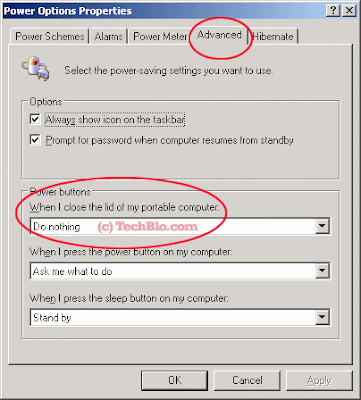
This would do the trick of not letting your laptop to go to standby mode when you close the Lid. The laptop can be left on for a few hours, but it is advisable to shut it down or hibernate as soon as your work is over.
You might as well ike to see -
- HIBERNATING / SUSPENDING THE MACHINE FROM THE COMMAND LINE
- Laptop goes to Standby mode - HowTo Avoid it?
technorati tags: hibernate, close laptop lid, laptop power adjustment
Wednesday, May 2
What is Wiki, Digg, and Kevin Rose doing with a HD DVD Hack?

Well the above mentioned code is actually a hack, that allows patrons to use HD-DVD movies in Linux. It actually helps decrypts the encryption in the HD DVD and allows a smooth play of the disk.
You might as well ask what is Jay Adelson - Digg CEO, and Kevin Rose got to do with these hacks? Did they release it? Gosh Nawh!
These guys are the top brats of the Digg.com website, and they have been talking like a tug of war, contradicting one another for about 10 to 20 hours now. They have been trying to gain some popularity on the search engines with the news[yak just like I do now], hell yes, they have been stirring this news just to top the charts.
What the Hack is 09-f9-11-02-9d-74-e3-5b -d8-41-56-c5-63-56-88-c0
Wow, then what is the federal government doing about it? - watching right now. Watching encrypted HD DVD with this hack is not legal, lets sit and watch where all this leads to ?
Technorati tags: Digg, Wiki, HD DVD Hack
Tuesday, May 1
Lets Understand Hibernation Better - Hibernating Your System for a faster start!!
Hibernation is a state of the computer that is equal to shut down. But the state of the computer is first written to the Hard Disk, and then the system is shut down theoritacially.
Turn Off the Computer Screen to Combat Global Warming - Post on Di, Amit Agarwal
I was browsing through Amit Agarwal's DI, and came across this post that claimed to help reduce global warming. The intentsion is good, and we all hope it helps reduce the effect of the highly suspected phenomenon "Global Warming" though scientists are starting to contradict counterpart's ideas about the very existance of Global Warming!
Well this post is not about the contradictions of Global Warming but about the fact that Amit claims "Hibernation" of a PC/Notebook is not eqivalent to shut down.
Hibernation is a state of regulated hypothermia undergone by some animals to conserve energy during the winter. - as this wikipedia explanation claims, the very english meaning is synonymous to "saving energy" !!
Hibernate (also known ambiguously as sleep mode) is a feature seen in many operating systems where the contents of RAM is written to non-volatile storage, such as the hard disk (as either a file or on a separate partition) before powering off the system. Later the system can be restored to the state it was in when hibernation was invoked, so that programs can continue executing as if nothing happened. Hibernating and restoring from hibernate is also generally faster than a hard reboot and, if necessary, can be done without user interaction (unlike shutting down, which often requires the user to specify if open documents should be saved).
Hibernation is a state of the computer that is equal to shut down. But the state of the computer is first written to the Hard Disk, and then the system is shut down theoritacially. Then when you press the power button again, the system restores/resumes from it's sleeping state, and presents all the applications that were kept open during Hibernation.
Hope Amit corrects the post, and think twice about global warming too. The world, some scientists still think can handle it's own good and bad, like the karma. That does not mean we need not care, but leave the earth to take care of itself than making a fuss about Global Warming.
You might as well like to see -
- HIBERNATING / SUSPENDING THE MACHINE FROM THE COMMAND LINE
- Laptop goes to Standby mode - HowTo Avoid it?
Technorati tags: Hibernate, Hibernating, Hibernation, Windows
Tuesday, April 10
HOW THE TRACKPAD/TOUCHPAD WORKS?
The trackpad, also known by the less-descriptive term touchpad, was invented
by a fellow named George E. Gerpheide in 1988. Gerpheide and his small
company patented the technology and called it GlidePoint, but it didn?t see
commercial success until Apple Computer introduced its PowerBook 500 series
laptops with trackpads in 1994. Since the trackpad mechanism doesn?t have any
moving parts, it?s less prone to being fouled by dirt and dust.
The trackpad relies on a principle called coupling capacitance to know where
your finger is. This has been defined as ?the transfer of energy from one circuit
to another by means of the mutual capacitance between the circuits.?
Capacitance is a measurement of the ability to store electric charge ? it?s the
potentially-lethal charge stored in a very large capacitor that makes opening up a
television or CRT monitor dangerous. Underneath the trackpad?s surface are
two layers of tiny rows of parallel wires known as electrodes. One row runs
from side to side, and the other from top to bottom, with a thin layer of material
between them. The two layers form a grid ? any point on the grid can be
identified by the two wires that cross paths at that point. Alternating current <>
runs through the wires, and there is a measurable capacitance between the two
layers of electrodes. When you touch the pad, a tiny amount of current from one
of the wires travels through the surface of the pad, and through your fingers, to
another wire. This miniscule change in the current through the wires changes the
capacitance between the two wires that cross paths under your finger. This
change in capacitance can be measured, and is associated with that spot on the
grid, so that the computer knows that?s where your finger is. As you move your
finger across the tiny grid, the computer?s cursor tracks a similar path across the
screen.
Since trackpads don?t rely on pressure or heat, you can?t use one if you?re
wearing mittens or have particularly greasy fingers ? electricity has to be able to
flow through your fingertip. So while these devices are generally impervious to
the dirt and dust that can foul a trackball, water droplets on the pad will confuse
the circuitry, since water conducts electricity. Likewise, if you accidentally
touch the pad with two fingers at once, it detects a change in capacitance at two
non-adjacent points on its grid, and doesn?t know what to do with that
information, so the cursor may jump around erratically on the screen.
That?s the one major drawback to trackpads from a technological standpoint ?
they actually measure position, rather than movement. Trackballs and mice can?
t only know when they?re being moved, so they just tell the computer to move
the cursor in a given direction ? there?s no way to make a jump from one point
to another without passing through the points in between. If you touch a
trackpad with multiple fingers, or get it wet, it will tell the computer to display
the cursor at non-adjacent locations, which results in cursor behavior that?s
largely inconsistent with what we expect from our computers. <> The trackpad?
s inventor saw the device as a more natural way for humans to interact with
graphical human-computer interfaces, but this unnatural behavior (and the
advent of affordable optical mice that also benefit from a lack of moving parts)
has limited the appeal of the technology to laptops and devices like Apple?s
iPod. - Thanks Joe Elliot
TYPES OF TOUCH SCREEN TECHNOLOGIES:
There are three types of touch screen technology:
* Resistive: A resistive touch screen panel is coated with a thin metallic
electrically conductive and resistive layer that causes a change in the electrical
current which is registered as a touch event and sent to the controller for
processing. Resistive touch screen panels are generally more affordable but offer
only 75% clarity and the layer can be damaged by sharp objects. Resistive touch
screen panels are not affected by outside elements such as dust or water.
* Surface wave: Surface wave technology uses ultrasonic waves that pass over
the touch screen panel. When the panel is touched, a portion of the wave is
absorbed. This change in the ultrasonic waves registers the position of the touch
event and sends this information to the controller for processing. Surface wave
touch screen panels are the most advanced of the three types, but they can be
damaged by outside elements.
* Capacitive: A capacitive touch screen panel is coated with a material that
stores electrical charges. When the panel is touched, a small amount of charge is
drawn to the point of contact. Circuits located at each corner of the panel
measure the charge and send the information to the controller for processing.
Capacitive touch screen panels must be touched with a finger unlike resistive
and surface wave panels that can use fingers and stylus. Capacitive touch
screens are not affected by outside elements and have high clarity.


